-
[css] border 속성으로 툴팁(tooltip)을 만들어보자HTML·Style/CSS 2023. 4. 13. 10:43
<div class="cart (추가할 class 자리)">
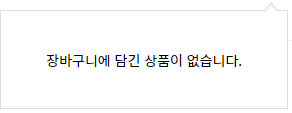
	<div class="cart-state">장바구니에 담긴 상품이 없습니다.</div>
<div>
1. 원하는 크기의 사각형 말풍선을 만들어 준다.
.cart-state {
    background-color: white;
    border: 1px solid gray;
    position: absolute;
    width: 288px;
    height: 99px;
    display: none;
}
2. 마우스 오버 시 class를 추가하는 JS 코드를 짠 후, 삼각형을 만들어 준다. (위치와 삼각형 모양은 알아서 조정)
.추가된class .cart-state::before {
    content: '';
    position: absolute;
    border-style: solid;
    border-width: 0 6px 8px 6px;
    border-color: gray transparent;
    top: -9px;
    right: 10px;
}

.추가된class .cart-state::after {
    content: '';
    position: absolute;
    border-style: solid;
    border-width: 0 6px 8px 6px;
    border-color: white transparent;
    display: block;
    top: -7px;
    right: 10px;
}
::before과 ::after의 top를 다르게 주어, 배경이 white인 gray 테두리를 가진 삼각형처럼 보일 수 있다.
말풍선 'HTML·Style > CSS' 카테고리의 다른 글
웹 폰트 최적화 기법 (0) 2023.05.10 [css] "text-indent: -9999px"보다 좋은 코드를 사용하자 (0) 2023.04.13 [css] z-index 이해하기 (0) 2023.04.09 [css] display: none 과 visivility: hidden의 차이점 (0) 2023.04.09 [css] display 속성의 inline, block, inline-block (0) 2023.04.09