-
[JS] 스크롤 프로그레스 바 구현하기Javascript 2023. 4. 29. 22:35
progress bar progress bar를 구현하려면 꼭 알아야 하는 기능들이 있다.
▶ 요소 사이즈와 스크롤
자바스크립트는 요소의 너비나 높이 같은 기하 정보 관련 프로퍼티를 지원한다.
이런 프로퍼티는 요소를 움직이거나 특정 좌표에 위치시킬 때 사용할 수 있다.
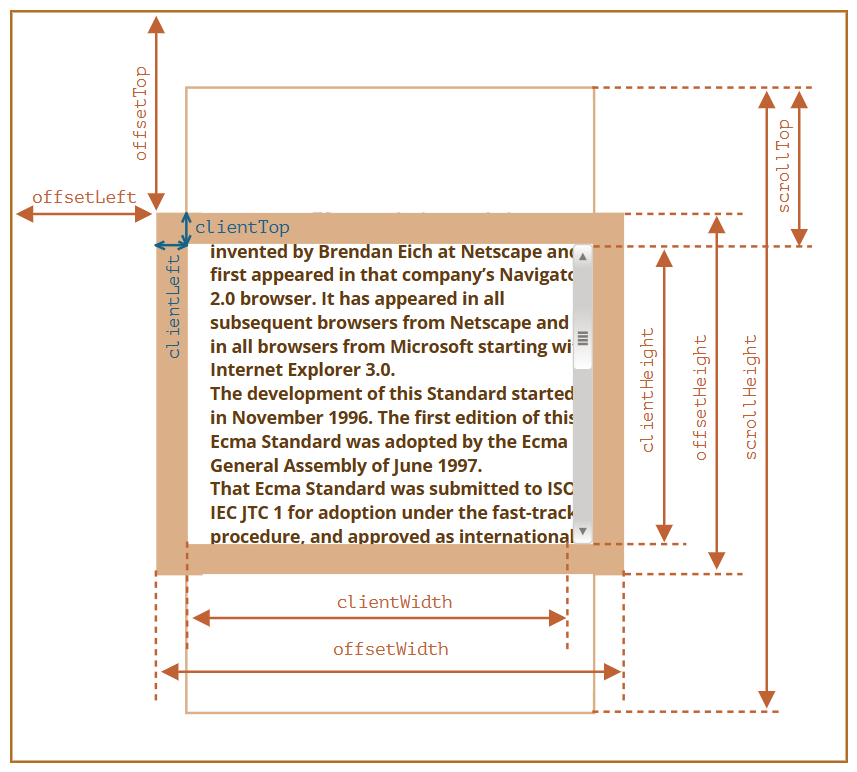
기하 프로퍼티(geometry property) - 기하 프로퍼티의 값은 숫자인데 그 단위는 '픽셀’이다.
- 자바스크립트로 요소 사이즈나 스크롤 높이 등을 알 수 있음
- 주황색 보더를 기준
- 보더 바깥쪽: offsetTop, offsetLeft
- 보더 사이: clientTop, clinetLeft
- 콘텐츠: clientWidth, clientHeight
- 보더 포함한 콘텐츠: offsetWidth, offsetHeight
- 콘텐츠의 전체 길이: scrollHeight
- 스크롤바의 수직 위치: scrollTop▶ 소스코드
.html
  <body>
    <div class="header">
      <div class="progress-container">
        <div class="progress-bar"></div>
      </div>
    </div>

    <div class="content">
		. . .
    </div>
    <script src="script.js"></script>
  </body>
.css
.header {
  position: fixed;
  top: 0;
  z-index: 1;
  width: 100%;
  background-color: #f1f1f1;
}

.progress-container {
  width: 100%;
  height: 8px;
  background: #c6c6c6;
}

.progress-bar {
  height: 8px;
  background: #ff9800;
  width: 0%;
}

.content img {
  display: block;
  padding: 10px 0;
}
.js
;(function () { 'use strict' const get = (target) => { return document.querySelector(target) } const $progressBar = get('.progress-bar') const onscroll = (e) => { const height = document.documentElement.scrollHeight - document.documentElement.clientHeight const scrollTop = document.documentElement.scrollTop const width = (scrollTop / height) * 100 $progressBar.style.width = width + '%' } const init = () => { window.addEventListener('scroll', onscroll) } init() })()
progress bar 'Javascript' 카테고리의 다른 글
[JS] 검색 기능 구현 (0) 2023.05.02 [JS] 무한스크롤(infinite scroll) : 스크롤이 문서의 끝에 닿았을 때, 추가 콘텐츠를 로드해보자 (0) 2023.05.01 [JS] throttle & debounce (0) 2023.04.29 [JS] querySelector과 querySelectorAll (0) 2023.04.28 [JS] 문서의 로드 시점(onload, DOMContentLoaded) (0) 2023.04.26